You can now log your Real Estate Professional Status (REPS) hours in ChatGPT. Install the REPS Time plugin, connect your account, and type or dictate something like "REPS Time: 2 hours today meeting my contractor at the rental." The entry lands in your REPS Time log, dated to when the work happened, and shows up in the app on web and mobile.
That's the whole thing. No new app to open. No end-of-week memory game.
Here's why that matters more than it sounds.
Written by Jennifer Beadles, a real estate investor who qualifies for REPS annually on her own portfolio and built REPS Time so logging hours takes seconds, not a Sunday afternoon.
Why Logging Is Where REPS Actually Falls Apart
To qualify for REPS under IRC §469(c)(7), one person has to clear two bars in the same tax year. More than 750 hours in real property trades or businesses where they materially participate. And more than half of all their working time spent in those businesses.
Most investors who lose REPS didn't fail to do the work. They failed to prove it.
The regulations don't require a specific format. Treas. Reg. §1.469-5T(f)(4) says participation can be shown by "any reasonable means," like appointment books, calendars, or narrative summaries. But the Tax Court keeps telling us what "reasonable" does not look like:
| Case | What went wrong |
|---|---|
| Almquist v. Commissioner, T.C. Memo. 2014-40 | The court rejected a log the taxpayer put together after the fact, calling it a "ballpark guesstimate." A 20% accuracy penalty followed. |
| Penley v. Commissioner, T.C. Memo. 2017-65 | Hours rounded to the nearest hour, no start or end times, and driving and meals mixed into the totals. Denied. |
| Moss v. Commissioner, 135 T.C. 365 (2010) | "On call" time didn't count. You have to actually perform the work. |
| Sezonov v. Commissioner, T.C. Memo. 2022-40 | Not enough records to back up the time claimed. Denied. |
The pattern is clear. The logs that hold up were written close to when the work happened, with real detail. The ones that fail were rebuilt later from memory.
And the honest reason people rebuild logs later? Logging in the moment is annoying. You finish a call with your property manager, you're already on to the next thing, and "I'll log it tonight" turns into "I'll log it this weekend" turns into December.
That's the gap the ChatGPT plugin closes. (If you want the full rundown on what a solid log looks like, read our guide to keeping a contemporaneous log for material participation.)
What the REPS Time ChatGPT Plugin Does
The REPS Time plugin connects ChatGPT to your REPS Time account. Once it's installed, you can log hours from any ChatGPT chat in plain language.
You can type the entry, or tap the mic and dictate it. ChatGPT pulls out what you did, how long it took, and when it happened, then logs it to REPS Time. Every entry is dated to when the work occurred, not when you got around to typing it.
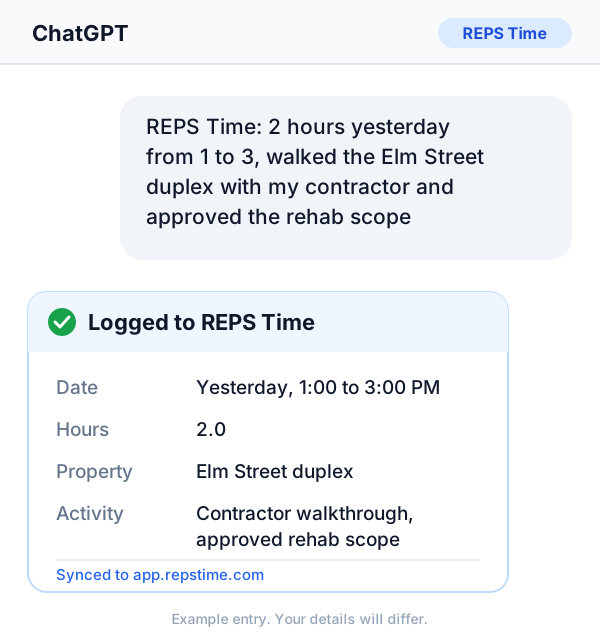
Your hours sync to the same log you already use at app.repstime.com and in the mobile app. So you can review your totals, check your progress, and export your records exactly like before. ChatGPT is just one more front door.
It works especially well if ChatGPT is already open on your laptop or phone most of the day. Lots of investors already ask it about leases, rehab budgets, and tenant emails. Now the same window logs your time.
How to Set Up REPS Time in ChatGPT
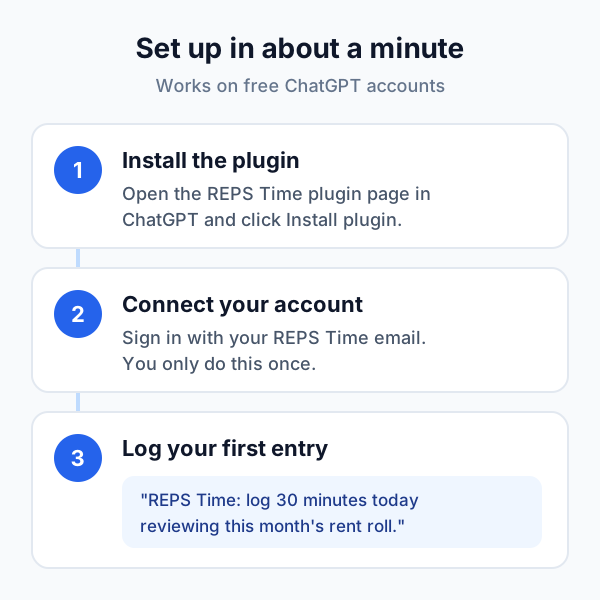
Setup takes about a minute.
What you need
- A ChatGPT account. A free account works. OpenAI makes the plugin directory available across ChatGPT plans, including Free.
- A REPS Time account. If you don't have one yet, start free here.
Steps
- Open the REPS Time plugin. While signed in to ChatGPT, go to the REPS Time plugin page and click Install plugin.
- Connect your REPS Time account. If ChatGPT asks you to sign in, use the same email you use for REPS Time. You only do this once.
- Log your first entry. Start a new chat and type or dictate: "REPS Time: log 30 minutes today reviewing this month's rent roll." Then check app.repstime.com and you'll see it there.
Using ChatGPT through work?
If your ChatGPT account belongs to a company workspace (Business, Enterprise, or Edu), your admin may need to allow the plugin before you can install it. A personal account avoids that.
Ready to stop losing hours? Add REPS Time to ChatGPT and log your next task the minute you finish it.
How to Write a ChatGPT Entry That Holds Up
ChatGPT makes logging fast. It doesn't make a vague entry better. The detail still has to come from you.
Every entry should answer four questions:
- What did you do? Name the task. "Interviewed two property managers," not "PM stuff."
- Which property or project? "The Elm Street duplex" or "the new build on 5th."
- How long? Be specific. 45 minutes is 45 minutes. Don't round up to an hour.
- When? Today, yesterday, Saturday. Add the time window if you know it, like "from 9 to 10:30."
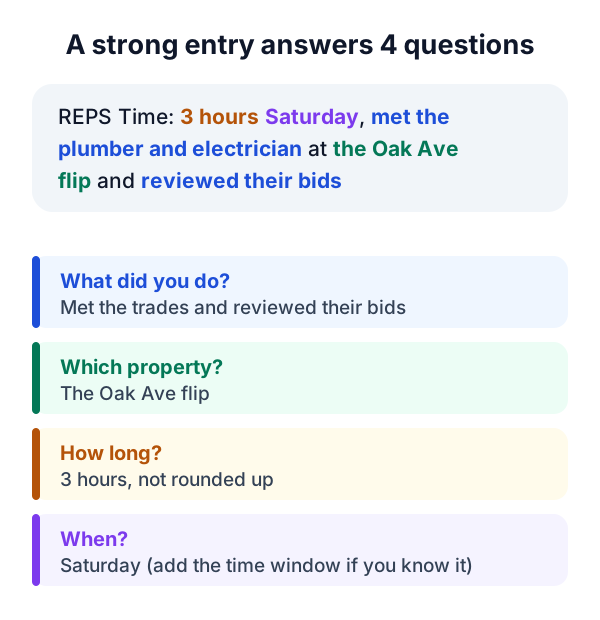
Starting your message with "REPS Time" helps ChatGPT know you want it logged, not just discussed.
Here's the difference in practice:
| Weak entry | Strong entry |
|---|---|
| REPS Time: 2 hours rental stuff | REPS Time: 2 hours yesterday from 1 to 3, walked the Elm Street duplex with my contractor and approved the rehab scope |
| REPS Time: phone calls today | REPS Time: 45 minutes this morning, tenant screening calls for unit B at the Maple fourplex |
| REPS Time: worked on the flip | REPS Time: 3 hours Saturday, met the plumber and electrician at the Oak Ave flip and reviewed their bids |
The strong entries are the ones that look good to an auditor two years from now. They're also the ones you'll actually understand when you're reviewing your log in March.
More examples you can steal
- "REPS Time: 1 hour this afternoon reviewing leases for renewal at the Pine St triplex."
- "REPS Time: 90 minutes yesterday interviewing two property management companies for the Phoenix rentals."
- "REPS Time: 2 hours Tuesday from 10 to 12, walked a potential acquisition with my agent and ran the numbers."
- "REPS Time: 30 minutes today approving a plumbing repair and paying the invoice for the Elm Street duplex."
What Still Doesn't Count (Even If It's Logged)
The plugin logs what you tell it. It doesn't decide whether your time qualifies. A few reminders from the case law:
- On-call time doesn't count. Being available isn't the same as working (Moss).
- Keep travel, meals, and breaks out of your work entries. Mixing them in was part of what sank the log in Penley. If you think travel time should count in your situation, log it as its own entry and talk to your CPA.
- Investor-type activities are risky. Reviewing financial statements or monitoring operations in a non-managerial capacity generally doesn't count toward material participation under Treas. Reg. §1.469-5T(f)(2)(ii).
- W-2 real estate work has a catch. Hours as an employee only count if you own more than 5% of your employer, per IRC §469(c)(7)(D).
And remember the second test. Your real estate hours have to be more than half of all your working hours, not just more than 750. Our guide to REPS time management walks through how to stay ahead of both.
Why Lower Friction Means More Hours on Paper
Here's the thing most people miss about REPS. The investors who come up short in December usually did enough work. They just didn't capture it.
Every task you forget to log is real time that disappears from your record. A 20-minute call here, a 40-minute bid review there. Forget just three 20-minute tasks a week and you lose about 52 hours by year end. That's roughly 7% of the 750 you need, gone without a trace.
Logging in ChatGPT shrinks the time between doing the work and recording it down to a sentence. When logging takes five seconds, you actually do it. And a habit you actually keep beats a perfect system you abandon in March.
For the full picture on qualifying, read the Complete Guide to Real Estate Professional Status (2026).
Frequently Asked Questions
Do I need ChatGPT Plus to use the REPS Time plugin?
No. OpenAI makes the plugin directory available across ChatGPT plans, including the free plan. If your ChatGPT account is part of a company workspace, an admin may need to enable the plugin first.
Does ChatGPT decide whether my hours qualify for REPS?
No. The plugin records the work you describe. Whether that work counts toward the 750-hour and more-than-half tests depends on the rules under IRC §469(c)(7) and your specific facts. Review your log with a qualified tax professional.
Are hours logged through ChatGPT dated correctly?
Yes. Entries are dated to when the work happened, not when you typed the message. For the strongest record, log the same day and include the time window when you can.
Can I use voice instead of typing?
Yes. Tap the microphone in ChatGPT and dictate your entry. ChatGPT turns it into text and logs it to REPS Time.
Will my ChatGPT entries show up in the REPS Time app?
Yes. Entries logged in ChatGPT go to the same account you use at app.repstime.com and in the mobile app, so your totals and exports stay in one place.
Start logging smarter today. Add REPS Time to ChatGPT in about a minute. New to REPS Time? Create your free account first, then connect it.
This content is for educational purposes only and does not constitute tax, legal, or financial advice. Tax laws are complex and individual circumstances vary. Always consult a qualified CPA or tax attorney before implementing any tax strategy. REPS Time is a product of Agents Invest LLC. Agents Invest LLC is not a CPA firm, law firm, or registered tax preparer.